Choose GreenLens if:
- You want to scan a plant and immediately know how to care for it.
- You need a health diagnosis after the scan, not just a species name.
- You want to save scanned plants and manage a care collection in one app.
Point. Scan. Quickly learn the plant, its care, and the next step.
GreenLens is a plant scanner for iOS and Android. Point your camera at a plant, tap Scan, and quickly get the species name, care requirements, and next-step guidance. Unlike basic scanners, it keeps going after the name.
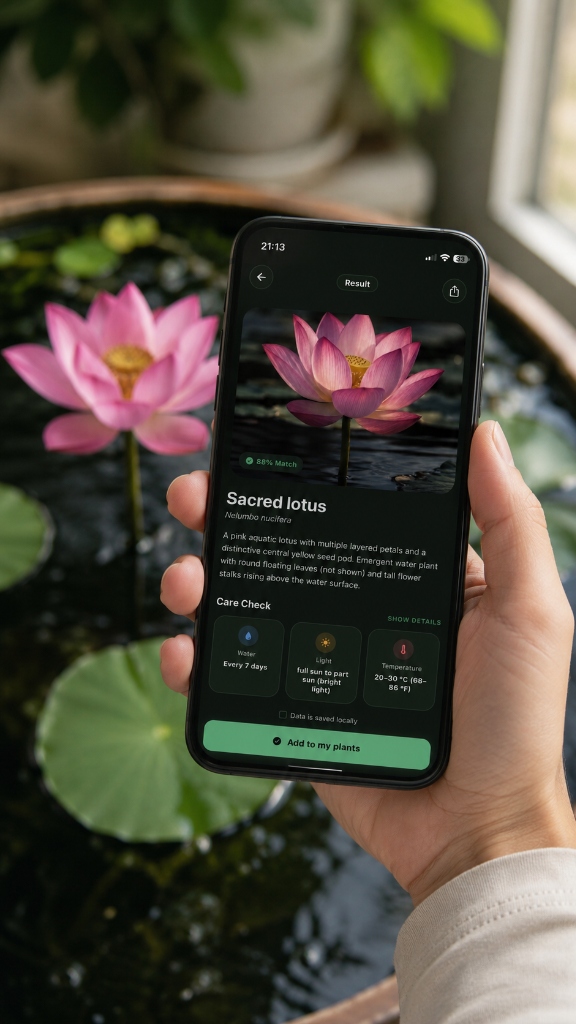
A plant scanner uses your phone camera and AI to identify plants from photos and return the species name. GreenLens extends scanning with an automatic care plan, context-aware watering reminders, and a health check tool — so a scan leads to action, not just a label.
How GreenLens turns a simple phone photo into a complete botanical analysis.
High-resolution capture analyzes leaf morphology, veins, and stem structure. Blurry images are discarded to ensure accuracy.
The model evaluates visible features and compares them with entries in a botanical database.
A second pass looks specifically for discoloration, pest traces, and wilting — based on diseases typical for the species.
Identification and health status combine into an individual care plan adapted to local light and placement.
Compare what happens after the suggested match: practical care guidance and next steps instead of only a name.
Regular care beats infrequent intensive care. Use reminders to build a good routine.
Plant Identifier App →AI scanning quickly returns the species name, common name, and plant profile.
Returns a species name and stops there.
Automatic care plan with watering schedule, fertilizing, and light requirements after every scan.
No care guidance — the scan ends at identification.
Dedicated health check analyzes visible symptoms and recommends the safest next action.
No health or disease diagnostic function.
Save scanned plants to a personal collection with care history, notes, and reminders.
Scan history only, with no ongoing care context.
Scan works with photos from your gallery — no live shot required.
Often live camera only, with no gallery scan option.
Open the app, point the camera at the plant, and tap Scan. GreenLens uses AI to match the image against its plant database and quickly returns the species name, plant profile, and care plan. You can also upload a photo from your gallery.
GreenLens includes free plant scanning. Advanced AI health checks and unlimited scans are available through paid credits or a subscription.
Yes. GreenLens analyzes photos from your gallery just as accurately as a live scan, as long as the photo shows the plant clearly with good lighting.
The GreenLens catalog covers more than 450 plant species, including common houseplants, garden plants, and succulents. Match quality depends on the photo and the plant, so review the suggestion before using its care guidance. For rare or regionally specific species, iNaturalist has a broader expert community.
After the scan, GreenLens shows the species name and plant portrait, then automatically generates a care plan with watering schedule, fertilizing guidance, and light requirements. You can save the plant to your collection and trigger a health check if it is showing symptoms.